Updated November 1, 2026. I've made some edits since this was first published. Every change is listed in the changelog at the bottom.
This is Part 2 of the CTI portfolio series. You'll need the infrastructure notes you saved at the end of Part 1. If you skipped that step, go grab a few domains from your sources now, I'll wait lol
One aspect of pivoting and actor tracking is infrastructure (see the Diamond Model). One part of infrastructure, certificates, had a WILD October, and showed a FANTASTIC example of why they're important in tracking! First, eMudhra, a certificate authority, revoked eight of its intermediate certificates after a researcher scanning public certificate data found their private keys could be cracked almost instantly. Mozilla and Chrome blocked them the same day, Apple a few days later, and eMudhra is now getting out of the global TLS certificate business. And a few days later, GoDaddy revoked over 400,000 certificates it had issued incorrectly. Back to why I'm telling you this: because that researcher caught the eMudhra keys for one beautiful reason: certificates are PUBLIC records. And today, those same public records are how we're going to find attacker infrastructure.
Part 1 focused on researching a group and writing about it. Part 2 will focus on doing the thing: take one indicator and find the infrastructure around it. This is the portfolio piece for the interview question "walk me through an investigation you've done." And if you did the beginner pivoting post and the Pivot Hunt, you already know some moves! Today we go WAY deeper on the certificates you collected in Part 1, and we add fingerprints, which are my favorites. 😏
Again, infrastructure pivoting is ONE slice of CTI work. The job is also reading a LOT of reports, tracking groups over time, and explaining all of it to people who will never care what a JARM is. The rest of the series gets to those parts. Today is the hands-on, follow-the-breadcrumbs part.
Some background and definitions
The goal of this is DEEP understanding of your tracking so you can answer interview questions that say "Ok, and what IS a TLS cert?" It's also helpful to know because an AI agent may say "OMG YOUR COMPANY ACTUALLY OWNS THE MALICIOUS TLS CERT" and panic ensues, but it's actually because it hit your company's DNS block... this will help so you don't call a 9 alarm fire on that false positive, because who would do that? 😅
DNS
When you look up a domain, your resolver does the asking for you. (The resolver is the server that handles DNS lookups on your behalf. Usually it's your ISP's, or a public one like 1.1.1.1 or 8.8.8.8.) It asks the root servers "who handles .com?", asks THOSE servers "who handles evil[.]com?", and then asks the domain's own nameservers for the answer. The answers are records: A (what IP), MX (where email goes), NS (those nameservers), and TXT. TXT records are free-form text the domain owner can put whatever they want in, and in practice they're mostly used to prove things: email security settings (SPF, DKIM, DMARC, which help other mail servers check whether email claiming to be from that domain is legit) and verification tokens, those random-looking strings Google, Microsoft, and other services make you add to prove you own a domain. And THAT is a sneaky good pivot: if the exact same verification token shows up on two domains, that's a strong hint the same account set up both (still check it against your other evidence!). The registrar is the company the attacker bought the domain from. Every one of those is a thing you can pivot on!
![Diagram of a DNS lookup: you ask your resolver for evil[.]com, the resolver asks a root server, then the .com TLD server, then the domain's own nameserver, which answers with the IP 203.0.113.7, and the resolver hands it back to you](/dns-lookup.svg)
TLS and Certificates
TLS (Transport Layer Security) is the encryption protocol behind HTTPS. It's the whole reason your browser shows a padlock. For the encryption to mean anything, the server has to prove it's really the right server, and that's the certificate's job. Most certs (and pretty much every cert an attacker gets) prove exactly one thing: whoever holds its private key could prove control of that domain to a certificate authority (a CA, one of the companies browsers agree to trust) at the moment it was issued. One handy detail for us: a cert lists EVERY domain it's valid for, in a field called the SANs (Subject Alternative Names). Certs also come in a chain: the site's cert (the "leaf") is signed by an intermediate, which is signed by a root your browser already trusts. That eMudhra story up top was an example of intermediates going bad, which is why browsers scrambled.
![Diagram of a certificate chain: a root CA trusted by your browser signs an intermediate CA, which signs the leaf cert for evil[.]com. The leaf's SANs list evil[.]com, evil-login[.]com and secure-evil[.]net, and every publicly trusted leaf is logged in Certificate Transparency, searchable on crt.sh](/cert-chain.svg)
Certificate Transparency
CAs have been compromised and tricked into issuing certs they shouldn't have (look up DigiNotar if you want the classic horror story, or just reread the first paragraph of this post for October's edition). So now major browsers like Chrome and Safari require publicly trusted certs (the padlock kind) to be published to Certificate Transparency logs. Public. Append-only. Anyone can look through them. (Self-signed certs skip all this since no CA is involved, so they never show up in CT logs. Hold that thought for JA4X!)
Passive DNS
Sensors around the internet record "this domain resolved to this IP on this date" and keep the history. So you can see where a domain USED to point, which is honestly often more interesting than where it points right now.
The Fingerprints: JARM and JA4X
Okay, the new toys!! These two connect servers and certs that share nothing else, and they're the part of this lab that makes people lean in when you explain it.
JARM
JARM, made by Salesforce and pronounced like the container you open + the body part, fingerprints a server's TLS personality. A scanner sends the server ten client hellos, each one weird in a different way (different TLS versions, different cipher orderings, and so on), records how the server answers each one, and hashes the answers into one 62-character fingerprint. How a server answers depends on its software, version, OS, and configuration. So two servers stood up from the same kit, configured the same way, share a JARM even when their domains, IPs, and certs have NOTHING in common. That's why it caught on for hunting C2 servers: the JARM repo itself lists fingerprints for Cobalt Strike, Trickbot, Metasploit and more, with almost no overlap with popular websites, and the SANS ISC write-up walks through hunting with it. (Fun catch: that Cobalt Strike JARM was recorded on Java 11's TLS, because Cobalt Strike runs on Java, so it's partly a Java fingerprint. Same list, same warning: JARM alone isn't enough to call something C2. Hold that thought for the pitfall!)
One big heads up from the ground rules: JARM is ACTIVE. Getting a JARM means sending those ten hellos to the server, aka knocking on the attacker's door ten times in a weird pattern. So for this exercise, we won't run it, we'll look up values other people already scanned. In Shodan that's the ssl.jarm: filter, and Censys indexes JARM too.
The JA4+ Family
Before getting deep into JA4+, a little family tree. JA4+ is a whole suite of fingerprints from FoxIO, and each one fingerprints a different piece of a connection: JA4 fingerprints how a client starts a TLS connection (so you can tell a browser from a piece of malware, it's the successor to the older JA3), JA4S is how the server answers, JA4H is HTTP clients, JA4SSH is SSH sessions, JA4T is the TCP layer underneath it all, and JA4X is certificates (there are a few more, the repo has the full list). Most of them need you to see the actual network traffic, which is SOC and network-team territory. A couple show up in internet scan data you can search from the outside (Censys has JA4S and JA4X), and JA4X is our pick today.
JA4X
JA4X (the newer one I was excited about in the series hub) fingerprints the certificate instead of the server, and since Censys already collected the certs, looking it up is passive. It hashes how the cert was BUILT: which issuer fields, which subject fields, which extensions, in what order, and not the values inside them. Think of it as a fingerprint of the cert's template. Why that's useful: C2 frameworks like Sliver, for example, auto-generate a random, self-signed cert for every new server (FoxIO counted over 400 lines of Sliver code just for that lol). Every cert is "unique," but they all came out of the same template, so they collapse into just a couple of JA4X values (FoxIO lists them in that same diagram). One catch: a big CA uses one program to make all its certs too, so its certs share a JA4X with tons of normal sites (FoxIO found 99.8% of certs issued by Microsoft's org share the same one). JA4X really shines on self-signed and homemade certs, and since those skip the CT logs, you'll find them in Censys scan data. Censys lets you search it (cert.parsed.ja4x), and Hunt.io's KEYPLUG write-up is a great example of it in the wild.

So which one when? JARM fingerprints how the SERVER behaves, JA4X fingerprints how the CERTIFICATE was made: reach for JARM when you have a server IP and want to find servers set up the same way, and reach for JA4X when you have a self-signed or homemade cert and want to find more certs cranked out by the same tool.
The pitfall, because there's always a pitfall: a fingerprint match by itself doesn't tell you much, because thousands of perfectly innocent servers share a JARM (they're all default nginx, or they're all behind the same CDN). Where it gets exciting is overlap: a shared fingerprint PLUS a shared cert, or PLUS passive DNS putting them on the same IP in the same window? NOW you have something. (Yes, this is the Pivot or Pitfall lab all over again and that's because it's the job! This is what you'll do in CTI!! )
Does This Actually Work? (Yes! Here's Proof)
Fair question: is this a real job skill, or just a fun lab? REAL. Researchers do these exact pivots and publish what they find. A few of my favorites, roughly in the order you'll use them in the lab:
Infoblox: SANs at scale. In Connecting Dots with SSL Certificates (Zafir Ansari and Darin Johnson, March 2026), they take the SAN pivot from step 3 and run it on millions of new certs a day. Every domain is a dot, every shared cert connects two dots, and any cluster with known-bad domains in it gets a closer look. They say that without the certificate analysis, they'd miss about 57% of the cert-related malicious domains they found, including a cluster of 109 Apple lookalike domains and 174 fake shopping sites. Here's the idea in our style:
![Diagram: three separate certificates share domains (Cert A and B both cover evil-sso[.]com, Cert B and C both cover evil-help[.]net), so they merge into one cluster. One domain, login-evil[.]com, is already known bad, which makes the other three worth checking too: guilt by association. Made-up domains; idea from Infoblox.](/cert-clusters.svg)
THOR Collective: one cert, a whole fake storefront. In Open Season: Certificate Transparency (Lauren Proehl, July 2026), a fake FIFA World Cup 2026 ticket shop pulled four certs in 21 minutes from three different CAs (which points to automated setup), and looping through the SANs from three starting domains turned up 25 domains. My favorite part: she's honest that when she checked against what Validin had already published, 46 of 49 names were already known. That's normal for a well-reported group, and it's the knowing when to stop lesson in real life.
Hunting Pandas: fingerprints plus overlap. In Hunting Pandas (Vasilis Orlof, April 2025), JARM combined with server header hashes, software versions, and hosting ASNs turned up 12 hosts tied to PlugX malware and Mustang Panda (also called RedDelta) with high confidence. A broader pivot on the header hash alone returned 400+ more, which he only rated medium confidence because they may include false positives. That's the pitfall from above in action: a fingerprint alone is a lead, a fingerprint plus overlap is a finding.
Hunt.io: JA4X on KEYPLUG. The KEYPLUG write-up pairs a JA4X with an odd cert field to map servers that earlier reporting tied to APT41 (the authors say that link is still uncertain, which is a great example of honest confidence language). Bonus lesson: that cert field later turned up in wolfSSL's standard server.pem certificate, so it stopped being a reliable indicator. Pivots EXPIRE, which is why you date everything.
Farsight: the classic passive DNS pivots. 8 Common DNSDB Pivots for Threat Hunting (Joe St Sauver, 2018) is old but gold. It walks through the shared-nameserver pivot from step 2 and the IP-to-domains pivots from step 4.
Lab 05: Pivot Out in an Hour
Audience check again, because it changes what you write. This one's tactical: you're writing for another analyst or a SOC, people who want the indicators, the connections, and your reasoning. Here's your intelligence requirement. Write it at the top of the page before you start:
"Starting from one domain, how much of this group's current infrastructure can we identify, and what should we watch or block?"
Set a timer! Same goal as Part 1: a finished first draft (she reminds herself, again). And same rule as always: everything in this lab is PASSIVE. You're reading records other people already collected, never touching the infrastructure yourself.
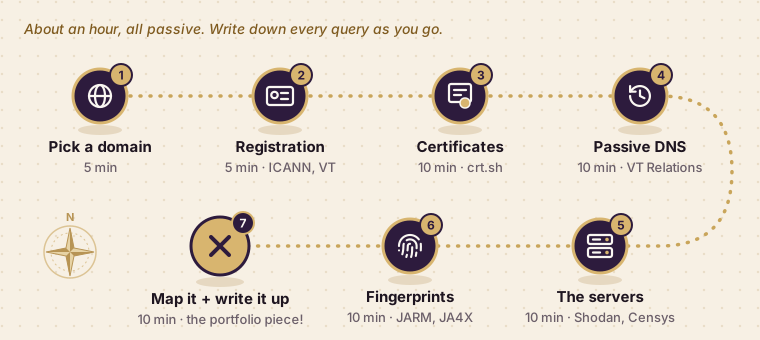
Before you start: WRITE DOWN YOUR QUERIES as you go. Every lookup you're about to do by hand (the crt.sh search, the VT relations, the Shodan query) is exactly what your Part 3 Python script is going to automate. Keep a running list of each query you ran and what you pulled out of it. That list is basically your Part 3 spec, past-you is about to be future-you's favorite coworker.
1. Pick Your Starting Domain (5 min)
Pick it from your Part 1 infrastructure notes. Write the intelligence requirement at the top of your draft. Skipped Part 1? Grab a recent phishing or C2 domain from ThreatFox (a free, community-run list of malicious indicators from abuse.ch), ideally one with a malware family or a report attached so you have some context. Look it up, but DON'T visit it!
2. Registration (5 min)
Look up who registered the domain, when, and with whom: ICANN Lookup for the current record, and VirusTotal keeps some WHOIS history for domains too. Most of it will be privacy-redacted, and that's normal! Focus on what's left: the registrar, the creation date, and the nameservers. A batch of domains registered at the same small registrar a few days apart, all on the same nameservers? That's a pattern. A giant registrar and Cloudflare nameservers? Not so much, millions of normal sites look like that.
3. Certificate Transparency (10 min)
Search %.yourdomain[.]com on crt.sh like we did in the pivoting post, but this time open the certs themselves. Collect every SAN (attackers LOVE reusing one cert across a batch of domains, so one cert with twelve SANs just handed you twelve leads). Note who issued each cert and when, that's your timeline forming. Then take each new SAN and search IT too, that's the loop from the THOR Collective example above.
4. Passive DNS (10 min)
The Relations tab in VirusTotal is the free version. Record every IP the domain resolved to WITH the dates, plus what else lived on those IPs. Dates matter A LOT here: two domains on the same IP in the same week is interesting, two domains on the same IP three years apart is probably just a recycled server.
5. The Servers (10 min)
Look your IPs up in Shodan and Censys. Open ports, software banners, the cert the server presents right now (self-signed? ooh, grab its JA4X from Censys!), and the JARM value they already scanned. Ask the question from the pivoting post: "what else looks like this server?" Heads up: free accounts get a limited number of searches (Censys gives free users 100 credits a month), so pick your queries carefully.
6. Fingerprint Pivots (10 min)
Search the JARM in Shodan (ssl.jarm:) and, if you found a self-signed cert, its JA4X in Censys (cert.parsed.ja4x). Everything that comes back is a lead to verify against your other evidence (remember the pitfall!), so check each candidate for overlapping certs or passive DNS before it earns a spot on your map. (Same move as Hunting Pandas above: the 12 high-confidence hosts were the ones where several things overlapped.)
7. Map It and Write It Up (10 min)
Draw the map (boxes and arrows, ugly is fine, mine are UGLY). Label every node observed, inferred, or unknown. Date every connection. Defang everything. Close with what you'd watch or block and why, plus a short "what we don't know" section (more on that in a sec).
Here's roughly what you're aiming for:
![A made-up example infrastructure map. The start domain login-evil[.]com links to a Let's Encrypt cert issued Oct 3 (crt.sh), whose SANs are evil-sso[.]com and evil-help[.]net. Passive DNS puts it on 203.0.113[.]7 from Oct 4 to 20, which also hosted evil-vpn[.]com on Oct 12. 198.51.100[.]23 is inferred: same JARM and set up the same week. Who is behind it is unknown. Solid lines are observed, dashed inferred, dotted unknown.](/lab-05-example-map.svg)
Grade Yourself
- Does every connection on my map have a source and a date?
- Did I label observed vs. inferred vs. unknown on everything?
- Did I touch the infrastructure at any point? (The answer should be NO lol but if it's yes... maybe give your computer a once over: any dock flickering? Maybe message me lol)
- Could I explain each pivot out loud? ("Why does a shared JARM matter? When does it NOT matter?")
- Did I stop at the first match, or keep pulling until I could actually answer the requirement? (ALWAYS REFER BACK TO THE REQUIREMENT)
- Are all IOCs defanged?
- Is there anything in here from my job? (Still: take it out!)
Other Threads You Could Pull
Registration, certs, DNS, and fingerprints are a great core, but they're not the whole toolbox. A few more for when you have time (or for your next portfolio piece):
- Hosting (ASN). An ASN (Autonomous System Number) tells you which network and provider an IP belongs to. Some groups keep coming back to the same small hosts, especially bulletproof hosting (providers that ignore abuse complaints on purpose). Shameless plug: I helped write Feedly's guide to ASN data for threat detection if you want to go deep on this one. 😏
- Favicons and page content. Phishing kits reuse the same little tab icon and HTML everywhere. Shodan can search by favicon hash (
http.favicon.hash:), which is a fun one. - Analytics and tracking IDs. One Google Analytics ID showing up on a bunch of sites usually means one owner. We did this one in the beginner pivoting post.
- urlscan.io. Someone may have already scanned the page, so you can see what it looked like without ever visiting it.
Knowing When to Stop
You could pivot on this stuff FOREVER. Every IP has neighbors, every cert has more SANs, and there is ALWAYS one more thread. But intel has a time limit. If the SOC gets your list of domains two weeks from now, the attacker has probably already moved on, and all that great research doesn't help anyone block anything. So you stop when you can answer your intelligence requirement well enough for someone to act on it, even if you never figure out who's behind it. Attribution is cool, but nobody needs to know the attacker's name to block their domain. Write down the threads you didn't get to as gaps or next steps, hand over what you have, and come back to it if it still matters. (And yes, this is secretly why the lab has a timer lol)
This is totally normal in real reports, by the way. A lot of them have a section called something like "intelligence gaps," "limitations," or "biases": what we don't know, what we didn't have time to research, and what might be skewing our view (like only having one vendor's data). Putting one in your write-up shows you know where your own analysis ends, and that's a really good look.
Be Ready to Talk About It
Same as Part 1: people will ask you about this instead of reading it. Practice these out loud:
- What does a shared JARM tell you, and what else would you want before calling two servers related?
- What does a SAN tell you? Is there anything it can't tell you?
- Two domains resolved to the same IP. When does that mean something?
- Why did you look up the JARM instead of scanning it yourself?
- How did you decide you were done?
The JARM one is secretly a question about judgment and OPSEC, and having a ready answer ("JARM is active, I don't touch adversary infrastructure, here's what I use instead") is the kind of thing interviewers remember.
Check Your Answers
Try answering them yourself first, THEN peek. There's no one perfect script, these are just to show you're on the right track:
- Shared JARM: the two servers are probably running the same software with the same setup. That's it! Tons of innocent servers share a JARM, so you'd want something else on top of it: a shared cert or SAN, passive DNS putting them on the same IP around the same time, or matching registration patterns.
- SANs: every domain on one cert was requested together, so the same person or service probably controls them all. What it CAN'T tell you: who that is, or whether every domain is malicious. Shared hosting and CDNs put unrelated customers on one cert sometimes.
- Same IP: it means something when the timing lines up (same week, not three years apart) and the IP isn't shared hosting or a CDN with thousands of other sites on it. Check how many domains live there before you get excited.
- Lookup instead of scanning: JARM is active, it sends traffic to the server. Scanning attacker infrastructure can tip them off and put your own IP in their logs. Shodan and Censys already scanned it, so I used their results.
- Knowing you're done: when I could answer the intelligence requirement well enough for someone to act on it. Then I wrote down what I didn't get to as gaps.
Resources
- crt.sh, Certificate Transparency log search
- Certificate Transparency: how it works
- Salesforce: JARM, the original write-up and tool
- SANS ISC: Threat Hunting with JARM
- FoxIO: JA4+ suite, JA4X lives here
- APNIC: JA4+ network fingerprinting, FoxIO's founder explaining JA4X and the Sliver example
- Censys: JARM fingerprints
- Hunt.io: Mapping KEYPLUG infrastructure with TLS certs and JA4X
- ICANN Lookup, current domain registration data
- VirusTotal, Relations tab for passive DNS
- Shodan and Censys
- Shodan search filters, including
ssl.jarmandhttp.favicon.hash - C2-JARM, a list of C2 framework JARMs and the TLS stacks behind them
- Real-world examples: Infoblox: Connecting Dots with SSL Certificates, THOR Collective: Open Season: Certificate Transparency, Hunting Pandas, Farsight: 8 Common DNSDB Pivots
Next up is Part 3, where we write a little Python to automate the boring half of what you just did by hand. Back to the series hub.
Changelog
- November 1, 2026 (later that day): Added "Does This Actually Work?" with real-world examples (Infoblox, THOR Collective, Hunting Pandas, Hunt.io, Farsight) and a diagram of how shared certs merge into one cluster. Added pointers to those examples in lab steps 3 and 6, and the links to Resources.
- November 1, 2026: Published.